Krea AI Review: Hands-On Test, Real Pricing & Limits

Krea AI Review: Krea AI is an all-in-one creative tool that brings real-time image drawing, upscaling, editing, and video generation into one single browser tab.
It is great for designers and concept artists who want fast visual ideas and clean upscaling. However, it is not ideal for heavy video creators because video tasks eat up monthly credits very fast.
Krea AI in 60 Seconds
- What It Is: An all-in-one browser studio for live sketching, AI image generation, upscaling, and video.
- Best Feature: The AI Enhancer, which sharpens low-resolution images with realistic texture recovery.
- Biggest Limitation: Video generation drains monthly compute units very quickly.
- Free Plan: 100 units/day for testing; no commercial rights.
- Starting Price: $9/month ($5/month on annual billing).
- Best User: Visual designers, freelancers, and creative directors needing fast visual iterations.
- Final Recommendation: Highly recommended for image and upscaling workflows; skip if you only produce bulk AI video.
Krea AI Rating
| Category | Score | Real-World Take |
| Overall | 8.2/10 | Solid all-in-one creative workspace for daily design work. |
| Image Generation | 8.5/10 | Clean lighting, natural skin tones, and good style matching. |
| Image Editing | 8.0/10 | Inpainting and background replacement blend well with original photos. |
| AI Video | 7.8/10 | Good for subtle camera pans, but complex movement gets blurry. |
| AI Upscaling | 9.0/10 | One of the best tools online for fixing low-resolution images. |
| Ease of Use | 8.5/10 | Very simple canvas layout; advanced nodes take some time to learn. |
| Reliability | 7.8/10 | Fast on daily tasks, but queues can slow down during heavy video jobs. |
| Value for Money | 7.6/10 | Great value for image workflows, but expensive for high-volume video. |
Quick Facts
| Metric | Details |
| Product | Krea AI |
| Official Website | krea.ai |
| Category | All-in-one AI creative studio and canvas |
| Free Plan | Yes (100 compute units per day for personal testing) |
| Starting Paid Price | $9/month ($5/month on annual billing) |
| Top Features | Real-time Canvas, Krea 2 model, AI Enhancer/Upscaler, Video, Node Workflows |
| Best For | Visual designers, freelance creators, and concept artists |
| Commercial Rights | Included in all paid plans (Basic, Pro, Max) |
| Open Source | Core web app is closed; select model weights (K2 Raw/Turbo) are open. |
What Is Krea AI?
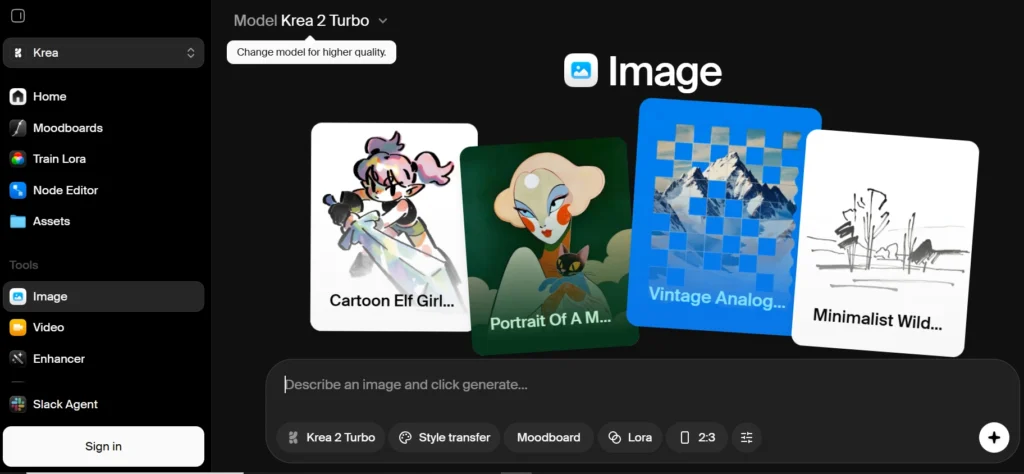
Krea AI is a web-based creative platform that combines image generation, image editing, upscaling, and video tools in one place.
Instead of switching between three different software tools, you can sketch an idea, turn it into a high-detail picture, upscale it to 8K, and animate it inside the same window.
I have tracked Krea since its early real-time sketching demos. Today, it has grown into a full creative workspace. It runs its own in-house diffusion model called Krea 2, while also letting you plug into third-party image and video engines.
The core idea is simple: speed up how fast an artist goes from a rough thought to a finished visual asset.
What Is Krea AI Used For?
- Live Concept Sketching: You make simple brush strokes or place basic shapes on one side of the screen, and Krea renders a realistic scene on the other side in real time.
- Commercial Product Visuals: You can place raw product photos into new backgrounds with studio lighting and natural shadows.
- Restoring Blurry Photos: The AI Enhancer sharpens soft web graphics, fixes noisy textures, and scales images up to high print resolutions.
- Social Media Video Clips: Marketers and editors turn still images into short cinematic motion shots.
- Automated Node Pipelines: Advanced creators build visual connection graphs (Nodes) to run generation, background removal, and upscaling in one click.
How I Tested Krea AI
I spent two full weeks putting Krea AI through its paces on both macOS and Windows using Google Chrome. I wanted to see how it performs in real daily work, not just in cherry-picked demo videos.
- Image Generation: I ran over 40 prompts covering portraits, product packshots, natural landscapes, and complex text signs.
- Real-Time Canvas: I tested 10 hand-drawn sketches to check latency and how well the brush responds to prompt changes.
- Upscaling: I fed 15 compressed images (from old 640×480 phone shots to modern web graphics) into the AI Enhancer.
- Video Generation: I generated 12 short video clips using both text prompts and static starter frames.
- Credit Tracking: I noted down exactly how many compute units each task consumed across the test period.
Krea AI Features: Detailed Analysis
| Feature | What It Does | My Real-World Result | Main Limitation |
| Krea 2 Image Generator | Text-to-image engine built by Krea. | Produces natural skin, realistic lighting, and soft shadows without looking plastic. | Complex text longer than four words still gets misspelled occasionally. |
| Real-Time Canvas | Live split-screen canvas that renders as you draw. | Extremely fast feedback; saves huge time when planning scene layouts. | Fine micro-details are hard to control purely with a mouse brush. |
| AI Enhancer & Upscaler | Reconstructs missing details in low-res photos. | Outstanding texture recovery on cloth, hair, and stone surfaces. | High slider settings can alter a real person’s facial structure. |
| AI Video Generation | Animates still images or text into short video clips. | Creates smooth camera pans and atmospheric ambient motion. | Fast movement or multiple moving people causes visual warping. |
| Node Workflows | Visual flowchart to link multiple editing steps. | Automates repetitive multi-step jobs without manual file saving. | Requires a short learning curve for beginner users. |
| Custom Style Models (LoRA) | Trains Krea on your specific brand style or character. | Keeps characters consistent across different backgrounds. | Requires good training images and burns a noticeable chunk of compute units. |
Hands-On Real-World Test Results
Test 1: Realistic People & Lighting
I prompted Krea 2 for a practical scene: “A portrait of a tea seller at an Indian railway station during early morning, warm sunlight, natural wrinkles, 35mm lens”.
The result was impressive. The skin did not have that greasy, fake sheen you often see in basic AI tools. The light coming through the steam looked natural, and the clothes had believable fabric weave.
Test 2: Text Spelling on Products
I tested how well Krea writes English words on labels. For short words like “FRESH” or “CHAI”, it got the letters right on the first try.
But when I asked for a full sentence on a signboard (“Fresh Ginger Tea Served Daily”), it mixed up two letters and dropped a word. For long text, you will still need Photoshop or Canva.
Test 3: Face Consistency Across Prompts
I uploaded a reference face and asked Krea to place the same person in three different scenes: an office, a garden, and a rainy street. The facial features remained recognizable in the office and garden shots.
When I added heavy rain and moody street lamps, the jawline shifted slightly. It is good for general continuity, but not 100% locked.
Test 4: Product Packshot Lighting
I uploaded a transparent PNG of a perfume bottle and asked Krea to place it on a wet black slate table with soft amber backlighting.
Krea blended the glass edges cleanly and drew realistic reflections on the wet table surface. It saved me at least 20 minutes of manual masking.
Test 5: AI Enhancer on a Blurry Image
I took an old, pixelated 720p photo and ran it through the Krea Enhancer. The tool did not just blur the pixels to make it look smooth; it actually added realistic skin pores and fabric threads.
In my testing, Krea’s upscaler remains one of its absolute best features.
What Krea AI Does Well
- One Single Creative Hub: You do not need five different websites open. Generating, editing, upscaling, and video happen in one workspace.
- Immediate Visual Feedback: The real-time drawing tool lets you test compositions in seconds rather than waiting for slow generation queues.
- Class-Leading Upscaler: The AI Enhancer is remarkably good at saving blurry or low-res graphics for print and high-res web use.
- Style Reference Control: You can upload multiple reference images to guide the exact mood, lighting, and colors of your output.
- Commercial Rights on Paid Plans: Every paid tier comes with commercial use permissions, making it safe for client and freelance work.
Limitations & Things to Watch Out For
- Video Burns Credits Very Fast: Video generation consumes compute units rapidly. A few video experiments can wipe out your monthly quota before you realize it.
- Free Plan Is Only for Testing: You get 100 units per day. That is enough to try roughly one high-end generation per day, and it does not include commercial rights.
- Unused Monthly Units Do Not Roll Over: On standard monthly plans, your compute units reset every billing cycle. You cannot hoard them for later months.
- No Official Native Mobile App: There is no official Android APK or iOS app in app stores. You have to use your mobile browser, which feels cramped on small phone screens.
- Long Text Struggles: Just like many diffusion models, rendering long sentences inside images often leads to spelling errors.
Krea AI Pricing in 2026
Note: By default, Krea’s website displays the annual monthly rate. Make sure you check whether you are selecting monthly or yearly billing.
| Plan | Monthly Billing | Annual Billing (per month) | Monthly Compute Units | Commercial Rights | Who It Is For |
| Free | $0 | $0 | 100 units/day | No | People testing basic features. |
| Basic | $9/mo | $5/mo ($63/year) | 5,000 units/mo | Yes | Beginners and light monthly image creators. |
| Pro | $35/mo | $21/mo ($252/year) | 20,000 units/mo | Yes | Freelancers, designers, and regular creators. |
| Max | $105/mo | $63/mo ($756/year) | 60,000 units/mo | Yes | Studios, power users, and video-heavy teams. |
Is Krea AI Worth the Money?
- For Freelancers and Designers: Yes, the Pro plan ($35/mo or $21/mo yearly) is the sweet spot. You get enough compute units for daily design work, access to 8K/22K upscaling, and Node workflows.
- For Casual Hobbyists: The Basic plan ($9/mo) is quite affordable if you only need 50 to 60 quality images a month.
- For High-Volume Video Creators: No. If you want to make hundreds of AI videos each month, buying credits inside Krea gets expensive very quickly compared to dedicated video tools.
Krea AI vs Midjourney vs Leonardo AI
| Feature | Krea AI | Midjourney | Leonardo AI |
| Main Focus | Unified Canvas & Workflow Studio | Photorealistic Art & Photos | Gaming Assets & Stylized Art |
| Real-Time Drawing | Yes (split-screen canvas) | No | Yes (Realtime Canvas) |
| AI Video | Yes (multi-model tools) | Very limited | Yes (Motion feature) |
| Upscaling Power | Excellent (adds realistic textures) | Standard resolution boost | Alchemy upscaler |
| Node Graph Workflows | Yes | No | No |
| Free Tier | 100 daily units | No | 150 daily tokens |
| Starting Paid Price | $9/mo ($5/mo annual) | $10/mo | $12/mo ($10/mo annual) |
| Best For | Multi-step design workflows | Standalone cinematic imagery | Game designers and concept art |
Community Feedback & User Sentiment
What Real Users Like:
- Workflow Speed: Many designers say the split-screen real-time canvas saves them hours during client mood-boarding sessions.
- Enhancer Quality: Public design communities regularly rank Krea’s upscaler as one of the best available on the web.
- Convenience: Having image generation, inpainting, and upscaling in one place stops creative fatigue.
Common User Complaints:
- Fast Credit Drain: Several users report that experimenting with video and high-end models consumes their monthly credits much faster than expected.
- Support Response Times: Community forums mention that billing and technical support replies can sometimes be slow.
- Mobile Experience: Working on a smartphone browser feels difficult because the desktop-focused interface has many small buttons.
Who Should Use Krea AI?
- Graphic and Web Designers: If you need to quickly mockup backgrounds, clean up product photos, and upscale assets for client websites.
- E-commerce Sellers: If you want to place clean product cutouts into lifestyle studio settings without paying for studio shoots.
- Creative Directors: If you need to rapidly test visual concepts during brainstorming meetings.
Who Should Skip Krea AI?
- Heavy AI Video Creators: If you need to produce dozens of video clips every day, your credit balance will drain too quickly.
- Phone-Only Creators: If you do all your creative work on an iPhone or Android phone, the browser interface will feel clumsy.
- Casual One-Off Users: If you just want to generate a fun profile picture once a month, free tools like Microsoft Copilot or Canva will do the job for free.
Final Verdict
Krea AI is a genuinely useful creative tool that has earned a permanent place in my daily design workflow. Its biggest strength is not just one magic feature; it is how smoothly everything connects together.
Being able to sketch an idea, generate a photo, fix the background, and upscale it to high resolution without leaving the page is a massive time-saver.
If you are a designer, agency freelancer, or visual artist, the Pro Plan offers solid practical value. Just be mindful of your credit consumption when testing video models.
Frequently Asked Questions
Is Krea AI completely free?
No. Krea AI has a free tier that gives you 100 compute units per day for personal testing. It does not give you commercial usage rights or full access to heavy video and upscaling features. Paid plans start at $9 per month.
What is Krea AI mainly used for?
Krea AI is mainly used for real-time concept sketching, generating images from text, upscaling blurry photos to high resolutions, and building automated image editing workflows.
How much does Krea AI cost in 2026?
On month-to-month billing, Krea AI costs $9/month for Basic, $35/month for Pro, and $105/month for Max. If you pay annually, the effective monthly prices drop to $5/month, $21/month, and $63/month respectively.
Is Krea AI open source?
No, the main Krea website and web platform are closed-source commercial software. However, the Krea team has shared select open-weight foundation models (like K2 Raw) with the developer community for research.
Is Krea AI safe to use for commercial client work?
Yes, as long as you are subscribed to any paid plan (Basic, Pro, or Max), Krea grants full commercial usage rights for all the images and assets you generate.
Is there an official Krea AI APK for Android phones?
No, there is no official Krea AI Android APK or iPhone app on Google Play or the Apple App Store. Krea runs in your desktop and mobile web browser. Never download unofficial APK files from random websites.