The AI Quest - Explore. Compare. Master the AI Era.
Latest Blogs

Explore. Compare. Master the AI Era.
Explore. Compare. Master the AI Era.
Krea AI Review: Krea AI is an all-in-one creative tool that brings real-time image drawing, upscaling, editing, and video generation into one single browser tab.
It is great for designers and concept artists who want fast visual ideas and clean upscaling. However, it is not ideal for heavy video creators because video tasks eat up monthly credits very fast.
| Category | Score | Real-World Take |
| Overall | 8.2/10 | Solid all-in-one creative workspace for daily design work. |
| Image Generation | 8.5/10 | Clean lighting, natural skin tones, and good style matching. |
| Image Editing | 8.0/10 | Inpainting and background replacement blend well with original photos. |
| AI Video | 7.8/10 | Good for subtle camera pans, but complex movement gets blurry. |
| AI Upscaling | 9.0/10 | One of the best tools online for fixing low-resolution images. |
| Ease of Use | 8.5/10 | Very simple canvas layout; advanced nodes take some time to learn. |
| Reliability | 7.8/10 | Fast on daily tasks, but queues can slow down during heavy video jobs. |
| Value for Money | 7.6/10 | Great value for image workflows, but expensive for high-volume video. |
| Metric | Details |
| Product | Krea AI |
| Official Website | krea.ai |
| Category | All-in-one AI creative studio and canvas |
| Free Plan | Yes (100 compute units per day for personal testing) |
| Starting Paid Price | $9/month ($5/month on annual billing) |
| Top Features | Real-time Canvas, Krea 2 model, AI Enhancer/Upscaler, Video, Node Workflows |
| Best For | Visual designers, freelance creators, and concept artists |
| Commercial Rights | Included in all paid plans (Basic, Pro, Max) |
| Open Source | Core web app is closed; select model weights (K2 Raw/Turbo) are open. |
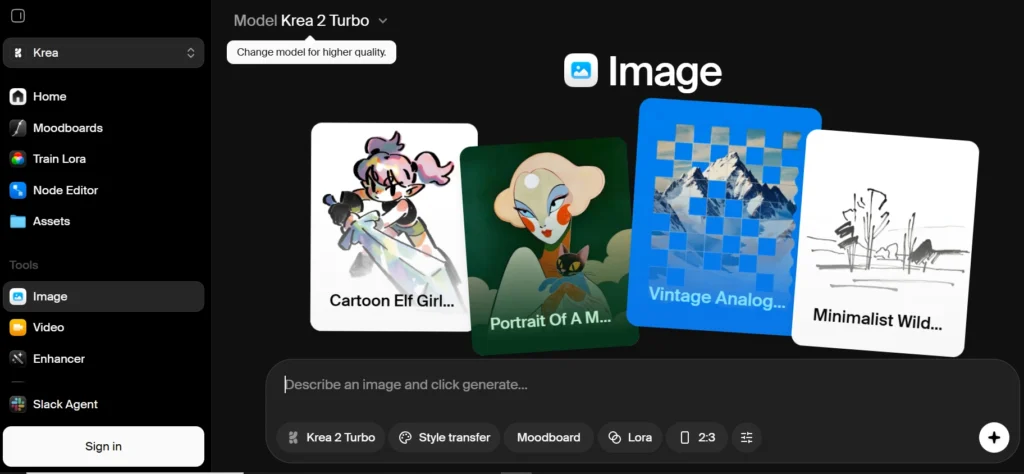
Krea AI is a web-based creative platform that combines image generation, image editing, upscaling, and video tools in one place.
Instead of switching between three different software tools, you can sketch an idea, turn it into a high-detail picture, upscale it to 8K, and animate it inside the same window.
I have tracked Krea since its early real-time sketching demos. Today, it has grown into a full creative workspace. It runs its own in-house diffusion model called Krea 2, while also letting you plug into third-party image and video engines.
The core idea is simple: speed up how fast an artist goes from a rough thought to a finished visual asset.
I spent two full weeks putting Krea AI through its paces on both macOS and Windows using Google Chrome. I wanted to see how it performs in real daily work, not just in cherry-picked demo videos.
| Feature | What It Does | My Real-World Result | Main Limitation |
| Krea 2 Image Generator | Text-to-image engine built by Krea. | Produces natural skin, realistic lighting, and soft shadows without looking plastic. | Complex text longer than four words still gets misspelled occasionally. |
| Real-Time Canvas | Live split-screen canvas that renders as you draw. | Extremely fast feedback; saves huge time when planning scene layouts. | Fine micro-details are hard to control purely with a mouse brush. |
| AI Enhancer & Upscaler | Reconstructs missing details in low-res photos. | Outstanding texture recovery on cloth, hair, and stone surfaces. | High slider settings can alter a real person’s facial structure. |
| AI Video Generation | Animates still images or text into short video clips. | Creates smooth camera pans and atmospheric ambient motion. | Fast movement or multiple moving people causes visual warping. |
| Node Workflows | Visual flowchart to link multiple editing steps. | Automates repetitive multi-step jobs without manual file saving. | Requires a short learning curve for beginner users. |
| Custom Style Models (LoRA) | Trains Krea on your specific brand style or character. | Keeps characters consistent across different backgrounds. | Requires good training images and burns a noticeable chunk of compute units. |
I prompted Krea 2 for a practical scene: “A portrait of a tea seller at an Indian railway station during early morning, warm sunlight, natural wrinkles, 35mm lens”.
The result was impressive. The skin did not have that greasy, fake sheen you often see in basic AI tools. The light coming through the steam looked natural, and the clothes had believable fabric weave.
I tested how well Krea writes English words on labels. For short words like “FRESH” or “CHAI”, it got the letters right on the first try.
But when I asked for a full sentence on a signboard (“Fresh Ginger Tea Served Daily”), it mixed up two letters and dropped a word. For long text, you will still need Photoshop or Canva.
I uploaded a reference face and asked Krea to place the same person in three different scenes: an office, a garden, and a rainy street. The facial features remained recognizable in the office and garden shots.
When I added heavy rain and moody street lamps, the jawline shifted slightly. It is good for general continuity, but not 100% locked.
I uploaded a transparent PNG of a perfume bottle and asked Krea to place it on a wet black slate table with soft amber backlighting.
Krea blended the glass edges cleanly and drew realistic reflections on the wet table surface. It saved me at least 20 minutes of manual masking.
I took an old, pixelated 720p photo and ran it through the Krea Enhancer. The tool did not just blur the pixels to make it look smooth; it actually added realistic skin pores and fabric threads.
In my testing, Krea’s upscaler remains one of its absolute best features.
Note: By default, Krea’s website displays the annual monthly rate. Make sure you check whether you are selecting monthly or yearly billing.
| Plan | Monthly Billing | Annual Billing (per month) | Monthly Compute Units | Commercial Rights | Who It Is For |
| Free | $0 | $0 | 100 units/day | No | People testing basic features. |
| Basic | $9/mo | $5/mo ($63/year) | 5,000 units/mo | Yes | Beginners and light monthly image creators. |
| Pro | $35/mo | $21/mo ($252/year) | 20,000 units/mo | Yes | Freelancers, designers, and regular creators. |
| Max | $105/mo | $63/mo ($756/year) | 60,000 units/mo | Yes | Studios, power users, and video-heavy teams. |
| Feature | Krea AI | Midjourney | Leonardo AI |
| Main Focus | Unified Canvas & Workflow Studio | Photorealistic Art & Photos | Gaming Assets & Stylized Art |
| Real-Time Drawing | Yes (split-screen canvas) | No | Yes (Realtime Canvas) |
| AI Video | Yes (multi-model tools) | Very limited | Yes (Motion feature) |
| Upscaling Power | Excellent (adds realistic textures) | Standard resolution boost | Alchemy upscaler |
| Node Graph Workflows | Yes | No | No |
| Free Tier | 100 daily units | No | 150 daily tokens |
| Starting Paid Price | $9/mo ($5/mo annual) | $10/mo | $12/mo ($10/mo annual) |
| Best For | Multi-step design workflows | Standalone cinematic imagery | Game designers and concept art |
Krea AI is a genuinely useful creative tool that has earned a permanent place in my daily design workflow. Its biggest strength is not just one magic feature; it is how smoothly everything connects together.
Being able to sketch an idea, generate a photo, fix the background, and upscale it to high resolution without leaving the page is a massive time-saver.
If you are a designer, agency freelancer, or visual artist, the Pro Plan offers solid practical value. Just be mindful of your credit consumption when testing video models.
No. Krea AI has a free tier that gives you 100 compute units per day for personal testing. It does not give you commercial usage rights or full access to heavy video and upscaling features. Paid plans start at $9 per month.
Krea AI is mainly used for real-time concept sketching, generating images from text, upscaling blurry photos to high resolutions, and building automated image editing workflows.
On month-to-month billing, Krea AI costs $9/month for Basic, $35/month for Pro, and $105/month for Max. If you pay annually, the effective monthly prices drop to $5/month, $21/month, and $63/month respectively.
No, the main Krea website and web platform are closed-source commercial software. However, the Krea team has shared select open-weight foundation models (like K2 Raw) with the developer community for research.
Yes, as long as you are subscribed to any paid plan (Basic, Pro, or Max), Krea grants full commercial usage rights for all the images and assets you generate.
No, there is no official Krea AI Android APK or iPhone app on Google Play or the Apple App Store. Krea runs in your desktop and mobile web browser. Never download unofficial APK files from random websites.