The AI Quest - Explore. Compare. Master the AI Era.
Latest Blogs

Explore. Compare. Master the AI Era.
Explore. Compare. Master the AI Era.
Quillbot: AI Writing Assistant: When you write daily, you often hit a wall. A sentence sounds clunky, a paragraph lacks flow, or you struggle to fix grammar errors on the fly.
QuillBot is built to solve these exact issues. It combines an AI paraphraser, grammar checker, translation tool, AI detector, and writing assistant into one platform.
Whether you are a student editing an essay or a blogger refining a post, it helps clean up your text quickly.
In this review, I share my hands-on experience using QuillBot across different writing tasks. I look at what works, where it fails, and whether the Premium upgrade is worth your money in 2026.
Overall Rating: 4.2/5
| Feature | Details |
| Product | QuillBot AI Writing Assistant |
| Best for | Paraphrasing, quick grammar edits, and translation |
| Paraphraser | Multiple modes (Standard, Fluency, Formal, Creative, etc.) |
| Grammar Checker | Fixes spelling, punctuation, and phrasing |
| AI Detector | Scans text for AI-generated patterns |
| Translator | Multi-language translation support |
| AI Keyboard | Cross-app editing for mobile devices |
| Free plan | Available with character limits |
| Premium | Unlocks all modes, higher limits, and advanced features |
| Platforms | Web, Browser Extensions, Mobile Apps |
| Android version | 4.8.1 |
| Last updated | 6 August 2026 |
| Android requirement | Android 7.0+ |
| Downloads | 5M+ |
| Developer | QuillBot |
QuillBot is an AI-powered writing and editing platform designed to help writers rewrite, polish, and evaluate their text.
Unlike a basic spell checker that only fixes typos, QuillBot restructures full sentences. It offers alternative phrasing, improves vocabulary, and adjusts the tone of your content.
You can use it via a web browser, extensions, or mobile apps to polish emails, essays, and articles.
Also Read: Canva AI Review (2026): Hands-On Testing, Features, Pricing, Pros & Cons
To evaluate QuillBot for this review, I tested its core features across common writing workflows:
My analysis focuses on output clarity, ease of use, and practical writing value.
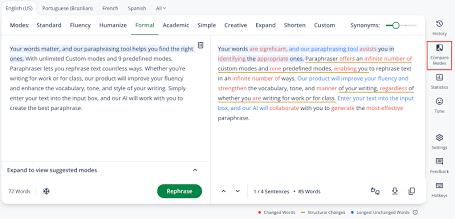
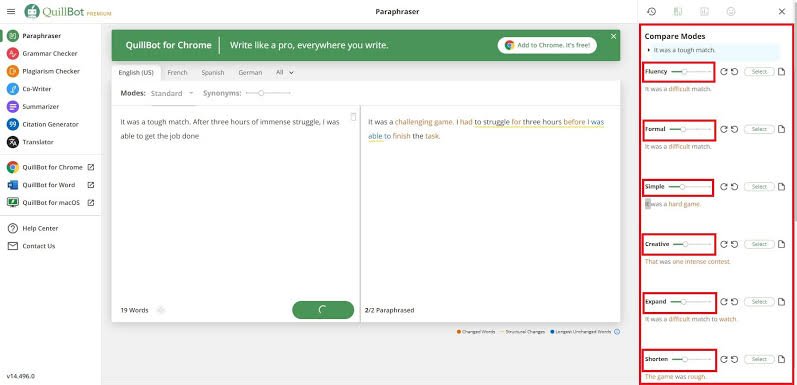
The Paraphraser remains QuillBot’s central feature. It rewrites text using different modes like Standard, Fluency, Formal, and Creative.
In my testing, short paragraphs were processed cleanly. The output usually retains the original idea while changing sentence structure. However, for highly technical or complex topics, you must review the output carefully to ensure the original meaning does not shift.
How to use QuillBot for article paraphrasing:
Note: Paraphrasing rearranges words, it does not make unoriginal content instantly copyright-safe or original.
The Grammar Checker flags spelling, punctuation, and grammatical mistakes in real time. It offers single-click corrections and context-aware suggestions. I found it fast for quick proofreading before publishing emails or short blog drafts.
QuillBot includes an AI Detector designed to spot patterns common in machine-generated text.
It is important to remember that no AI detector is 100% accurate. Detection algorithms rely on statistical patterns, which means human writing can sometimes be misflagged, and AI text can pass. Use these results as rough signals, never absolute proof.
The Humanizer tool aims to rephrase stiff, structured text into a more conversational tone.
While it helps smooth out repetitive phrasing, it does not guarantee text will bypass all detection systems, nor does it replace careful human editing. Responsible writers should focus on adding personal insight, real examples, and verified facts.
QuillBot’s Translator converts sentences, paragraphs, and documents across multiple languages. During testing, it performed well for straightforward passages, making it a handy tool for cross-language communication.
The mobile AI Keyboard brings paraphrasing, grammar corrections, and translation directly into your mobile apps.
It requires Android 7.0 or higher. During setup, the app requests system accessibility permissions to read and edit on-screen text across apps. Users should always review permissions carefully before enabling cross-app keyboard features on personal devices.
QuillBot includes generative writing tools to help draft sentences, generate ideas, and overcome writer’s block. It works best as an outline builder or brainstorming companion rather than an automated author.
The AI Chat feature provides quick answers, writing suggestions, and structural ideas directly inside your workflow, making it useful when planning content.
QuillBot includes light visual generation tools to help create supporting media, though it remains primarily focused on text editing.
You can save and manage edited documents locally or in your account workspace, making it easier to resume past editing projects.
Very useful if you text or send a lot of messages on your phone to people whom you need to sound professional to. They also have this app as an extension for your browser, and that thing is such a lifesaver for charting. It has its glitches here and there, but so far it’s the best grammar corrector out there for both phone and PC at this moment in time. (All typos and grammar corrected with the tap of the widget icon)
Thanks for showing us some love! We’re glad that our grammar checker is helping you level up your writing. Helping users create great things is our top priority, and we’re here if you ever need help with anything. Happy writing!
Good keyboard but correction process is very slow .we have to wait for seconds to find out accurate results . Very very slow. I hope, you will fix it soon .Secondly, I tried my best but could not log in with Facebook or google . Please fix it . Ultimately, after updating it became nice. There is not option to delete search history. Keep it up. 👍👍
Thank you for your feedback! We appreciate you mentioning the slow correction process and login issues. We’re glad the recent update helped. We’re working on enhancing the search history deletion feature. For further assistance, please reach out here: https://help.quillbot.com/hc/en-us/requests/new. Thank you!
This is just a basic sentient app. I would love it if you could just move the icon into a different spot and not have it down in the right corner, but the way I’m in right now would be ok to move it too in different rotations; that’s all. This is very good. No bug or anything. And it DOES make sure all grammar is perfect. Can you also remove the “;” it’s adding in every sentence I say? It’s a bit weird.
Thanks for the awesome feedback! We’re thrilled that you find our grammar checker helpful. If there’s anything we can do to make your experience even better, just let us know!
Students can use QuillBot to improve essay readability, fix grammar, and expand vocabulary. However, academic integrity requires using it as an editing assistant rather than an automated content generator. Always cite original sources and double-check school policies regarding AI tools.
Bloggers can use QuillBot to fix awkward sentences, shorten wordy paragraphs, and brainstorm headline variations. [Internal Link Opportunity: AI Writing Tools]
You remain responsible for checking facts, adding original insight, and doing final edits before hitting publish.
A common misconception is that paraphrasing text automatically removes plagiarism.
Paraphrasing tools change word choice and sentence layout, but relying on another author’s ideas without credit is still plagiarism. QuillBot offers a dedicated plagiarism checking tool for Premium users, which compares text against online databases to flag matching sources.
Rewriting a passage with an AI paraphraser does not remove the need for citations, original thought, and proper source attribution.
Yes, QuillBot offers a free plan. You can use the free Paraphraser, basic Grammar Checker, and Translator without paying.
However, the free plan places character limits on paraphrasing inputs and restricts access to advanced modes. Because free limits and feature allocations change over time, check QuillBot Premium for current details.
QuillBot’s website offers monthly, semi-annual, and annual subscription tiers. On mobile app platforms, the Google Play Store lists in-app purchases ranging from ₹799 to ₹3,999 depending on the plan duration and region. For current web subscription options and official feature breakdowns, visit the QuillBot Premium page.
Pros:
Cons:
While QuillBot is a strong writing assistant, it has practical limitations:
A standard grammar checker flags typos, missing commas, and basic agreement errors. QuillBot does that, but also restructures full sentences, adjusts tone, translates text across languages, and provides mobile editing tools in one ecosystem.
QuillBot is ideal for writers, students, bloggers, and non-native English speakers who want a fast tool to refine prose, fix grammar errors, and explore alternative phrasing.
If you require hands-off academic writing, automated fact-checking, or guarantee of complete textual originality without manual effort, QuillBot is not a standalone solution. It is an editing aid, not an autonomous writer.
QuillBot is used for paraphrasing text, correcting grammar, translating languages, scanning for AI patterns, and improving overall writing clarity.
Yes, QuillBot provides a free plan with access to basic paraphrasing modes and grammar checking subject to character limits.
Yes, QuillBot offers fast, accurate paraphrasing for general text, though long or technical passages should be reviewed manually for accuracy.
No, paraphrasing alone does not remove plagiarism. You must still cite original sources, check facts, and add original analysis.
Yes, QuillBot is worth using for anyone who needs to quickly edit drafts, polish emails, or improve sentence flow on a daily basis.