Google NotebookLM Review: The AI Research Assistant You Didn’t Know You Needed
Get our in-depth NotebookLM review, with real testing, audio accuracy, mobile limitations, performance insights, and pricing details.


If you regularly work with PDFs, documents, research notes, or long-form articles, NotebookLM is an AI tool that can genuinely transform your workflow.
Today, we take a deep dive into this tool after extensive hands-on testing.
The biggest superpower of this tool? When you upload PDFs, Google Docs, personal notes, YouTube video links, or articles, it reads through those files and provides razor-sharp, accurate answers based strictly on your uploaded material.
Developed by Google, and now also referred to as Gemini Notebook– it doesn’t behave like standard AI chatbots that generate guesswork pulled from the entire web. NotebookLM works exclusively within the boundary of the documents you feed it.
From college students to veteran corporate researchers, professionals everywhere are putting it to work.
Let’s break down what makes it special, where it shines, and where it still falls short.
The AI Quest Evaluation
Tested & Verified Review Standards
8.7
Out of 10.0 (Excellent)
Our composite rating reflects rigorous empirical testing across five core operational vectors:
Accuracy & Citation Grounding
9.1 / 10
Research & Synthesis Quality
9.0 / 10
Value for Money
8.6 / 10
Speed & System Latency
8.5 / 10
User Experience & Mobile UX
7.4 / 10
What Makes NotebookLM Stand Out?
- Answers Grounded Strictly in Your Data: It doesn’t hallucinate or make things up. If it isn’t in your document, NotebookLM won’t invent it.
- Precise Citations & Proof: Every response comes with clickable reference numbers. Tapping one takes you straight to the exact paragraph in your original file where that information lives.
- Audio Overviews (The Podcast Feature): It can convert lengthy, dry research papers into an engaging two-host conversational podcast that you can easily listen to on the go.
- Broad File Support: It seamlessly accepts PDFs, Google Drive files, Word documents, web URLs, and YouTube video links.
- Built-in Code Runner: Upload an Excel or CSV file, and it can execute backend code to perform calculations and data crunching automatically.
- Generous Free Tier: With a standard Google account, you can create up to 100 notebooks and upload up to 50 sources per notebook at zero cost.
Where the Tool Falls Short
- Clunky Mobile Experience: The mobile app lacks multi-file selection, and deleting sources requires jumping through multiple menus.
- No Note Editing on Mobile: Inside the mobile app’s ‘Studio’ tab, you can listen to audio, but you cannot edit or refine your saved notes.
- No Audio Playback Memory: If a call interrupts you or you close the app while listening to an Audio Overview, it loses your place rather than resuming where you left off.
- Struggles with Poor Quality Scans: Blurry PDFs, handwritten notes, or complex unstructured tables can lead to missed characters and incomplete parsing.
- Requires an Active Internet Connection: It runs entirely in the cloud. No internet means no access.
- Podcast Duration Limits: Generated Audio Overviews are generally capped at around 15 to 20 minutes.
Who is NotebookLM Best For?
- Students & Researchers: Anyone needing to synthesize stacks of books and research papers into clear, accurate study guides quickly.
- Corporate & Legal Teams: Teams parsing through dense contracts, terms, and compliance policies to extract exact clauses.
- Content Writers & Journalists: Creators extracting structured outlines from whitepapers, transcripts, press releases, or interview recordings.
- Auditory Learners: Anyone who prefers listening to conversational audio over reading 50-page technical documents.
Who Should Look Elsewhere?
- All-in-One Workspace Seekers: Those looking for integrated project management, tasks, and notes in a single tool (like Notion).
- Mobile-First Users: Anyone who does the bulk of their productive work strictly from a smartphone rather than a laptop or desktop.
- Offline Workers: Teams with strict offline requirements who cannot upload files to the cloud.
- Heavy Data Analysts: Power users running complex mathematical modeling or massive multi-sheet Excel operations.
Core Features Breakdown
1. Grounded Chat & Summaries
- What it does: Ask any question regarding your uploaded sources, and it retrieves accurate answers sourced entirely from your files without hallucinations.
- Who benefits: Anyone needing dependable, source-backed answers without reading hundreds of pages.
- Real-world Example: Upload annual reports from five different companies and prompt: “Create a comparison table highlighting the operational risks reported by all five companies this fiscal year.”
- Limitation: If you upload more than 20 massive files at once, it can occasionally prioritize earlier documents and gloss over nuances in later ones.
2. Audio Overviews (AI Podcast)
- What it does: Converts your documents into a dynamic, conversational podcast hosted by two AI voices—sounding remarkably like a real radio or studio show.
- Who benefits: People who experience reading fatigue or prefer absorbing information during a daily commute.
- Real-world Example: Upload a 50-page academic paper, generate an Audio Overview, and listen to the core takeaways during your drive.
- Limitation: You cannot manually edit the generated script, and episodes generally max out around 20 minutes.
3. Studio Workspace
- What it does: Pin the best responses from your chat, draft custom notes, and compile structured briefs inside a dedicated workspace.
- Who benefits: Users who gather bite-sized insights and want to assemble them into a final document.
- Real-world Example: Pin answers from three separate prompts, merge them into a unified brief, and export directly to Google Docs.
- Limitation: The mobile view is largely read-only; drafting and fine editing are effectively desktop-only features.
4. Deep Research (Automated Web Discovery)
- What it does: Don’t have source documents ready? Enter a topic, and it can scout the web for relevant, credible articles and pull them directly into your notebook.
- Who benefits: Anyone kicking off research on an unfamiliar subject from scratch.
- Limitation: On broad or generic topics, it can occasionally pull surface-level blog posts alongside authoritative papers.
5. Code Sandbox
- What it does: Upload spreadsheets or CSVs, and NotebookLM can run backend code to compute statistics, aggregates, and calculations on demand.
- Who benefits: Anyone handling survey results, data tables, or tabular reporting.
- Limitation: It can slow down on exceptionally large datasets and does not produce complex standalone visual dashboards.
Hands-on Experience: Our Real-World Testing
Using NotebookLM on desktop is clean, fast, and remarkably clutter-free. The interface is organized into an intuitive three-column layout: Sources on the left, Interactive Chat in the center, and the Studio Workspace on the right.
When we uploaded 5 heavy technical papers on battery technology and requested a structured comparison table, NotebookLM generated a comprehensive matrix in under 5 seconds. Even better, every metric came paired with a specific citation pinpointing the exact page and source file.
Where you feel friction is source management at scale. When you upload 30 to 40 files, the lack of folder organization becomes apparent, everything sits in a single vertical list, making locating individual documents somewhat tedious.
Community Insights
Specific User Feedback Examples
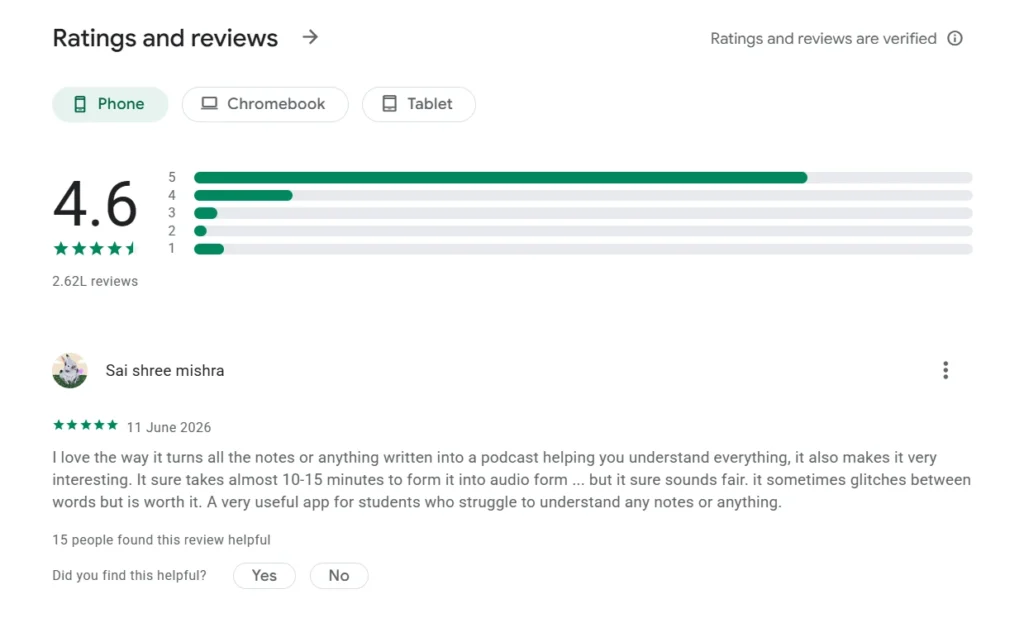
Praised Features
Highlighted strong core concepts, noting that the tool is immensely helpful for student research and learning workflows.
Critical Usability Flaws
Selecting multiple local sources at once is unsupported, source deletion requires navigating nested menus, and there is no option to cancel an accidental upload.
Praised Features
Considers the underlying product power “flipping brilliant,” especially on the full desktop browser version.
Mobile Studio Limitations
The mobile app restricts the Studio panel primarily to generating voice overviews, preventing users from viewing or editing written notes on the go.
Praised Features
Great for explaining complex game synopses, movie plots, and metaphors through custom podcast lengths during mundane tasks or commutes.
Playback & Duration Caps
Hard 20-minute maximum cap on podcast generation, and the mobile audio engine fails to save playback positions across app sessions.
Pricing Overview
| Plan | Monthly Cost | Highlights |
| Standard (Free) | ₹0 / $0 | Free Audio Overviews (3/day), automatic research capabilities. |
| Plus (Google AI Plus) | ~$4.99 – $7.99 | Included free across select Google Workspace business tiers. |
| Pro (Google AI Pro) | ~$19.99 (approx. ₹1,950) | Includes expanded model access and 2TB Google Drive storage. |
| Ultra (Google AI Ultra) | ~$99.99 – $200 | Includes Video Overviews and up to 30TB storage. |
Competitor Comparison
| Feature | Google NotebookLM | ChatGPT (Plus) | Perplexity AI | Claude (Pro) | Microsoft Copilot |
| Core Strength | 100% source-grounded answers & Audio Overviews | Conversation, drafting, and programming | Real-time web discovery & search | Long-form analysis and nuanced prose | Microsoft 365 (Word, Excel) integration |
| Citations | Pinpoints exact source paragraphs | Broad text references | Direct web links | Highlights excerpts from attachments | Links to corporate/Office files |
| Audio Feature | Dual-host conversational podcast | Conversational Voice Mode | Text-to-speech reading | No built-in audio | Text-to-speech reading |
| Knowledge Scope | Strictly limited to your uploaded sources | General training data + attachments | Live web + attachments | General training data + attachments | Enterprise data + web |
| Best Suited For | In-depth study, research, and synthesis | Coding, ideation, and general writing | Real-time news and fact-finding | Drafting long reports and nuanced writing | Streamlining enterprise Office workflows |
Frequently Asked Questions (FAQs)
1. Is NotebookLM completely free to use?
Yes. Anyone with a personal Google account can access the core features without providing credit card details.
2. Does it work offline?
No. NotebookLM requires an active internet connection to process queries and generate outputs.
3. Is my uploaded data used to train Google’s public AI models?
According to Google’s privacy documentation, data and files uploaded to NotebookLM are not used to train their public consumer AI models.
4. What is the per-file upload limit?
You can upload files up to 200MB in size or containing roughly 500,000 words per source.
5. How is NotebookLM different from the standard Google Gemini chatbot?
Gemini is a general-purpose AI assistant drawing answers from broad web knowledge. NotebookLM restricts its answers strictly to the files you supply.
6. Can I edit the Audio Overview podcast script?
You can provide custom steering instructions before generating the audio to focus on specific themes, but you cannot manually edit the script once generated.
7. Why is it being referred to as Gemini Notebook?
Google has steadily unified its AI tool ecosystem under the Gemini umbrella brand, aligning NotebookLM closely with that naming convention.
8. Can NotebookLM read Excel spreadsheets?
Yes. You can upload .xlsx or .csv files and ask questions or run calculations directly against the data.
Our Verdict
NotebookLM tackles AI’s biggest flaw—hallucinations—and virtually eliminates it by confining responses to verified source material.
If you are a student, analyst, researcher, or knowledge worker drowning in long reports, this tool can save you dozens of hours every week.
And the Audio Overview feature isn’t just an impressive party trick, it is a genuinely effective way to digest complex material.