QuillBot: AI Writing Assistant Review 2026

Quillbot: AI Writing Assistant: When you write daily, you often hit a wall. A sentence sounds clunky, a paragraph lacks flow, or you struggle to fix grammar errors on the fly.
QuillBot is built to solve these exact issues. It combines an AI paraphraser, grammar checker, translation tool, AI detector, and writing assistant into one platform.
Whether you are a student editing an essay or a blogger refining a post, it helps clean up your text quickly.
In this review, I share my hands-on experience using QuillBot across different writing tasks. I look at what works, where it fails, and whether the Premium upgrade is worth your money in 2026.
- Best For: Students, bloggers, non-native English speakers, and everyday writers.
- Free Version: Useful base paraphrasing and grammar checks with strict character limits.
- Premium: Unlocks full modes, faster speed, higher limits, and additional writing tools.
- Main Strength: Fast, natural-sounding paraphrasing with custom modes.
- Main Limitation: Paraphrasing can occasionally change the original meaning of complex sentences.
Overall Rating: 4.2/5
QuillBot At A Glance
| Feature | Details |
| Product | QuillBot AI Writing Assistant |
| Best for | Paraphrasing, quick grammar edits, and translation |
| Paraphraser | Multiple modes (Standard, Fluency, Formal, Creative, etc.) |
| Grammar Checker | Fixes spelling, punctuation, and phrasing |
| AI Detector | Scans text for AI-generated patterns |
| Translator | Multi-language translation support |
| AI Keyboard | Cross-app editing for mobile devices |
| Free plan | Available with character limits |
| Premium | Unlocks all modes, higher limits, and advanced features |
| Platforms | Web, Browser Extensions, Mobile Apps |
| Android version | 4.8.1 |
| Last updated | 6 August 2026 |
| Android requirement | Android 7.0+ |
| Downloads | 5M+ |
| Developer | QuillBot |
What Is QuillBot?
QuillBot is an AI-powered writing and editing platform designed to help writers rewrite, polish, and evaluate their text.
Unlike a basic spell checker that only fixes typos, QuillBot restructures full sentences. It offers alternative phrasing, improves vocabulary, and adjusts the tone of your content.
You can use it via a web browser, extensions, or mobile apps to polish emails, essays, and articles.
Also Read: Canva AI Review (2026): Hands-On Testing, Features, Pricing, Pros & Cons
How We Tested QuillBot
To evaluate QuillBot for this review, I tested its core features across common writing workflows:
- I ran awkward draft paragraphs through the Paraphraser to test sentence flow and accuracy.
- I used the Grammar Checker on raw draft text to test context-aware corrections.
- I tested the Translator with simple and multi-paragraph text samples.
- I ran sample texts through the AI Detector to test how it flags structured AI output.
- I installed the AI Keyboard to test cross-app writing assistance on mobile devices.
My analysis focuses on output clarity, ease of use, and practical writing value.
QuillBot Features
1. AI Paraphraser
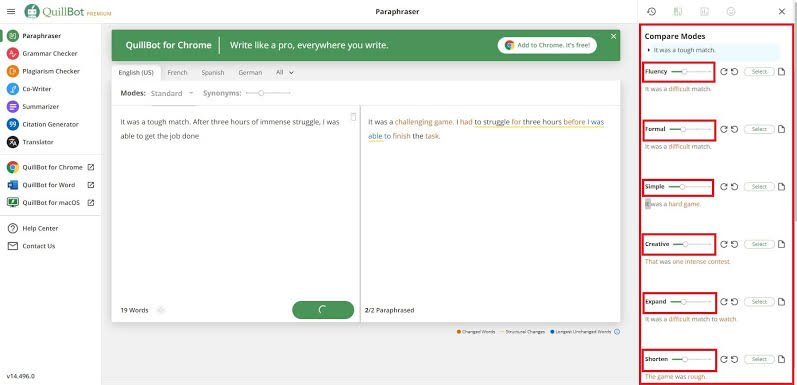
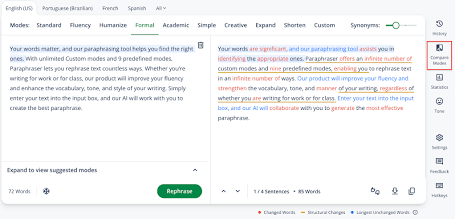
The Paraphraser remains QuillBot’s central feature. It rewrites text using different modes like Standard, Fluency, Formal, and Creative.
In my testing, short paragraphs were processed cleanly. The output usually retains the original idea while changing sentence structure. However, for highly technical or complex topics, you must review the output carefully to ensure the original meaning does not shift.
How to use QuillBot for article paraphrasing:
- Open QuillBot.
- Select the Paraphraser tool from the menu.
- Paste or type your draft text into the input box.
- Choose your desired mode (e.g., Fluency or Formal).
- Review the rewritten text on the right pane.
- Verify facts, meaning, and tone manually.
- Run a grammar check and save your final text.
Note: Paraphrasing rearranges words, it does not make unoriginal content instantly copyright-safe or original.
2. Grammar Checker
The Grammar Checker flags spelling, punctuation, and grammatical mistakes in real time. It offers single-click corrections and context-aware suggestions. I found it fast for quick proofreading before publishing emails or short blog drafts.
3. AI Detector
QuillBot includes an AI Detector designed to spot patterns common in machine-generated text.
It is important to remember that no AI detector is 100% accurate. Detection algorithms rely on statistical patterns, which means human writing can sometimes be misflagged, and AI text can pass. Use these results as rough signals, never absolute proof.
4. AI Humanizer
The Humanizer tool aims to rephrase stiff, structured text into a more conversational tone.
While it helps smooth out repetitive phrasing, it does not guarantee text will bypass all detection systems, nor does it replace careful human editing. Responsible writers should focus on adding personal insight, real examples, and verified facts.
5. Translator
QuillBot’s Translator converts sentences, paragraphs, and documents across multiple languages. During testing, it performed well for straightforward passages, making it a handy tool for cross-language communication.
6. AI Keyboard
The mobile AI Keyboard brings paraphrasing, grammar corrections, and translation directly into your mobile apps.
It requires Android 7.0 or higher. During setup, the app requests system accessibility permissions to read and edit on-screen text across apps. Users should always review permissions carefully before enabling cross-app keyboard features on personal devices.
7. Generative AI Writing
QuillBot includes generative writing tools to help draft sentences, generate ideas, and overcome writer’s block. It works best as an outline builder or brainstorming companion rather than an automated author.
8. AI Chat
The AI Chat feature provides quick answers, writing suggestions, and structural ideas directly inside your workflow, making it useful when planning content.
9. Image Generation
QuillBot includes light visual generation tools to help create supporting media, though it remains primarily focused on text editing.
10. Local Document Save
You can save and manage edited documents locally or in your account workspace, making it easier to resume past editing projects.
Ratings & Reviews
QuillBot: AI Writing Assistant4.8
50L+ downloads
Very useful if you text or send a lot of messages on your phone to people whom you need to sound professional to. They also have this app as an extension for your browser, and that thing is such a lifesaver for charting. It has its glitches here and there, but so far it’s the best grammar corrector out there for both phone and PC at this moment in time. (All typos and grammar corrected with the tap of the widget icon)
QuillBot Developer
1 July 2026
Thanks for showing us some love! We’re glad that our grammar checker is helping you level up your writing. Helping users create great things is our top priority, and we’re here if you ever need help with anything. Happy writing!
Good keyboard but correction process is very slow .we have to wait for seconds to find out accurate results . Very very slow. I hope, you will fix it soon .Secondly, I tried my best but could not log in with Facebook or google . Please fix it . Ultimately, after updating it became nice. There is not option to delete search history. Keep it up. 👍👍
QuillBot Developer
22 July 2026
Thank you for your feedback! We appreciate you mentioning the slow correction process and login issues. We’re glad the recent update helped. We’re working on enhancing the search history deletion feature. For further assistance, please reach out here: https://help.quillbot.com/hc/en-us/requests/new. Thank you!
This is just a basic sentient app. I would love it if you could just move the icon into a different spot and not have it down in the right corner, but the way I’m in right now would be ok to move it too in different rotations; that’s all. This is very good. No bug or anything. And it DOES make sure all grammar is perfect. Can you also remove the “;” it’s adding in every sentence I say? It’s a bit weird.
QuillBot Developer
18 May 2026
Thanks for the awesome feedback! We’re thrilled that you find our grammar checker helpful. If there’s anything we can do to make your experience even better, just let us know!
How To Use QuillBot
For Student Writing
Students can use QuillBot to improve essay readability, fix grammar, and expand vocabulary. However, academic integrity requires using it as an editing assistant rather than an automated content generator. Always cite original sources and double-check school policies regarding AI tools.
For Blog Writing
Bloggers can use QuillBot to fix awkward sentences, shorten wordy paragraphs, and brainstorm headline variations. [Internal Link Opportunity: AI Writing Tools]
You remain responsible for checking facts, adding original insight, and doing final edits before hitting publish.
QuillBot and Plagiarism
A common misconception is that paraphrasing text automatically removes plagiarism.
Paraphrasing tools change word choice and sentence layout, but relying on another author’s ideas without credit is still plagiarism. QuillBot offers a dedicated plagiarism checking tool for Premium users, which compares text against online databases to flag matching sources.
Rewriting a passage with an AI paraphraser does not remove the need for citations, original thought, and proper source attribution.
Is QuillBot Free?
Yes, QuillBot offers a free plan. You can use the free Paraphraser, basic Grammar Checker, and Translator without paying.
However, the free plan places character limits on paraphrasing inputs and restricts access to advanced modes. Because free limits and feature allocations change over time, check QuillBot Premium for current details.
QuillBot Pricing
QuillBot’s website offers monthly, semi-annual, and annual subscription tiers. On mobile app platforms, the Google Play Store lists in-app purchases ranging from ₹799 to ₹3,999 depending on the plan duration and region. For current web subscription options and official feature breakdowns, visit the QuillBot Premium page.
QuillBot for Different Users
- Students: Useful for sentence corrections, tone adjustments, and learning better phrasing.
- Bloggers: Handy for quickly rewriting awkward sentences and speeding up light editing.
- Content Writers: Useful for generating phrasing variations during heavy drafting sessions.
- Professionals: Great for refining emails and polishing internal work communications.
- Non-Native English Writers: Excellent for picking up natural phrasing, correct prepositions, and clear sentence flow.
Pros and Cons
Pros:
- Clean, simple interface that is easy to navigate.
- Effective paraphrasing with custom tone modes.
- Fast real-time grammar and punctuation fixes.
- Useful mobile keyboard integration for on-the-go editing.
- Accessible free version for quick daily checks.
Cons:
- Paraphrasing can sometimes distort original meaning in technical text.
- Free plan input character limits can feel restrictive.
- AI detection features are not absolute and require manual context.
QuillBot Limitations
While QuillBot is a strong writing assistant, it has practical limitations:
- Meaning Shifts: Rewriting long or technical sentences can lead to incorrect context. Manual review is always required.
- Detection Reliability: No AI detector can prove authorship with 100% certainty.
- Permissions: The mobile AI Keyboard requires access permissions that privacy-conscious users should carefully consider before installation.
QuillBot vs. A Normal Grammar Checker
A standard grammar checker flags typos, missing commas, and basic agreement errors. QuillBot does that, but also restructures full sentences, adjusts tone, translates text across languages, and provides mobile editing tools in one ecosystem.
Who Should Use QuillBot?
QuillBot is ideal for writers, students, bloggers, and non-native English speakers who want a fast tool to refine prose, fix grammar errors, and explore alternative phrasing.
Who Should Not Use QuillBot?
If you require hands-off academic writing, automated fact-checking, or guarantee of complete textual originality without manual effort, QuillBot is not a standalone solution. It is an editing aid, not an autonomous writer.
FAQs
What is QuillBot used for?
QuillBot is used for paraphrasing text, correcting grammar, translating languages, scanning for AI patterns, and improving overall writing clarity.
Is QuillBot free?
Yes, QuillBot provides a free plan with access to basic paraphrasing modes and grammar checking subject to character limits.
Is QuillBot good for paraphrasing?
Yes, QuillBot offers fast, accurate paraphrasing for general text, though long or technical passages should be reviewed manually for accuracy.
Can QuillBot remove plagiarism?
No, paraphrasing alone does not remove plagiarism. You must still cite original sources, check facts, and add original analysis.
Is QuillBot worth using?
Yes, QuillBot is worth using for anyone who needs to quickly edit drafts, polish emails, or improve sentence flow on a daily basis.