Copy.ai Review (2026): In-Depth Analysis, Benchmarks, and Real-World Limitations


Copy.ai review 2026: Is Copy.ai still worth it in 2026? It pivoted from a simple AI writer into a heavy GTM sales workflow engine. We tested its multi-model routing, automated prospect sequences, and live speed benchmarks across 14 days.
Here is our honest, unbiased breakdown of where it shines, where it fails, and why its pricing gap trips up small teams.
1. Quick Rating & Key Metrics
| Metric | Details |
|---|---|
| Overall Rating | 7.8 / 10 |
| Primary Category | Go-To-Market (GTM) AI Workflow Automation & Sales Orchestration |
| Developer / Company | Copy.ai, Inc. |
| Base Pricing | Starts at $29/month (Chat Plan, 5 seats); Workflow tiers start at $1,000/month |
| Summary Verdict | Copy.ai has moved away from basic AI writing to focus on automated sales and marketing pipelines. Its multi-model options and custom workflow nodes work well, but the jump to automation pricing tiers and UI memory lag under heavy data loads limit its value for smaller teams. |
2. Overview & Core Context
Copy.ai started back in 2020 as a simple wrapper around OpenAI’s early text models. Back then, marketers used it mostly for drafting Facebook ad captions, headline variants, and short social posts.
Over the last two years, the team completely changed direction. They shifted focus from simple text generation to Go-To-Market (GTM) process automation.
Today, the platform tries to solve a practical problem for RevOps and sales teams. Instead of typing individual prompts into a chat bar to draft single outbound emails, users set up automated workflows.
These workflows pull prospect data from target websites, process information against saved company sheets, and generate multi-step sales outreach sequences in bulk.
The primary customer target is no longer the solo blogger or independent copywriter. The platform now targets B2B sales teams, growth marketers, and revenue operations groups running high-volume prospecting pipelines.
Point-solution tools like Jasper focus heavily on editorial brand voice and long-form blog drafting. In contrast, Copy.ai focuses on backend data flow and repetitive lead enrichment tasks.
This strategic change creates a clear divide between standard chat users and enterprise workflow customers.
3. How We Tested (Hands-On Testing Methodology)
To evaluate Copy.ai objectively, our team ran a 14-day practical test inside a structured workplace environment. We intentionally avoided canned marketing demos and ran real operational workloads.
Benchmark Setup
- Testing Window: 14 full working days of multi-user daily testing.
- Prompt & Dataset Suite: 165 structured prompts across cold sales outreach, technical document extraction, ad variation batching, and CRM payload formatting.
- Team Environment: 4 active workspace seats with custom role permissions enabled.
- Hardware & Network Environment: Apple M2 Pro (32GB RAM) and Windows 11 (AMD Ryzen 9, 64GB RAM) connected over gigabit fiber (average ping: 12ms).
Measured Parameters
- Average Response Latency: Measured time-to-first-token (TTFT) and full run completion times for standard chat versus multi-node automated workflows.
- Token Degradation Point: Tested context limits where instructions began to drop off during long document analysis.
- Pipeline Failure Rate: Tracked the percentage of workflow runs that failed due to web scraping blocks, JSON formatting bugs, or API timeouts.
- System Resource Usage: Monitored system memory consumption during long editing sessions with large datasets.
4. Key Strengths & Operational Pros
Multi-Model Backend Routing
A practical technical advantage of Copy.ai is its backend model selection. Users are not restricted to a single provider.
The workspace allows direct switching between OpenAI (GPT-4o), Anthropic (Claude 3.5 Sonnet), and Google (Gemini 1.5 Pro).
During our comparative tests, Claude 3.5 Sonnet consistently generated cleaner, more natural language for cold email drafts. Meanwhile, GPT-4o handled structured data extraction and JSON output tasks with fewer syntax errors.
Giving teams the option to pick specific models for specific tasks in one dashboard avoids vendor lock-in and saves money on separate software accounts.
                  ┌───────────────────────────┐
                  │   Copy.ai Workspace       │
                  └─────────────┬─────────────┘
                                │
        ┌───────────────────────┼───────────────────────┐
        ▼                       ▼                       ▼
┌───────────────┐       ┌───────────────┐       ┌───────────────┐
│  OpenAI       │       │  Anthropic    │       │  Google       │
│  (GPT-4o)     │       │  (Claude 3.5) │       │  (Gemini 1.5) │
└───────┬───────┘       └───────┬───────┘       └───────┬───────┘
        │                       │                       │
        ▼                       ▼                       ▼
  Structured Data        Natural Language       Fast Content
  & JSON Processing      & Cold Outreach        Drafting & Analysis
Custom Workflow Engine for Sales Pipelines
The visual Workflow builder lets growth teams automate repetitive research and outreach tasks. During our benchmark run, we built a 4-step sales development workflow:
- Extract text from a target company domain and a prospect’s public profile.
- Scrape recent press releases and product updates from the company site.
- Match company attributes against internal product positioning stored in the workspace.
- Draft a personalized 3-step outreach sequence.
We ran this pipeline across a batch file of 50 target prospect rows. The entire batch completed in 4 minutes and 12 seconds with minimal instruction drift.
For sales development representatives doing high-volume account research, this saves hours of manual copy-pasting.
Infobase Context Centralization
The Infobase feature acts as an internal knowledge library. Teams upload product documentation, pricing sheets, brand guidelines, and target audience profiles.
When drafting content, the AI queries these stored reference files directly.
In our test, we loaded 12 product documentation sheets into the Infobase. We then ran 30 separate generation tasks asking for technical feature summaries. The system pulled correct technical specs and pricing details in 28 out of 30 tests. This reduces the time managers spend fact-checking raw drafts.
Workspace Access & Team Controls
Multi-user administrative features are handled sensibly. Workspace admins can restrict access to specific automated workflows, prevent team members from editing core Infobase context files, and track credit usage across team seats.
Content editors can easily review and clean up outreach drafts produced by sales representatives before exporting the records to external CRMs.
5. Critical Cons & Real Limitations
Large Price Gap Between Tiers
The pricing structure creates a clear barrier for growing businesses. The basic Chat plan costs $29/month (or $24/month billed annually) for up to 5 users.
However, this entry plan does not include access to the automated visual Workflow builder or direct CRM integrations.
To unlock workflow automation features, a team must upgrade directly to the Growth tier at $1,000/month (billed annually at $12,000/year).
There are no middle-tier options. A 3-person team that wants simple automated workflows gets priced out immediately.
┌─────────────────────────────────────────────────────────────┐
│ Chat Plan: $29/mo (5 Seats, Chat Only, No Workflows)        │
└─────────────────────────────────────────────────────────────┘
                              │
     PRICING GAP: $971/mo    │  No intermediate options
     (Workflow Access Locked) │  for small growth teams
                              ▼
┌─────────────────────────────────────────────────────────────┐
│ Growth Plan: $1,000/mo (75 Seats, Workflows Billed Annually)│
└─────────────────────────────────────────────────────────────┘
High Credit Burn on Multi-Step Workflows
On workflow-enabled tiers, tasks consume monthly workflow credits. Simple two-step tasks consume only a few credits. However, multi-step GTM pipelines, which combine live web scraping, model checks, and multi-version draft generation, consume between 40 and 120 credits per prospect row.
In our batch run with a 200-prospect target list, a single complex pipeline used over 14,000 credits in less than two hours. High-volume sales teams can burn through monthly credit limits faster than expected, forcing early plan upgrades.
Instruction Drift on Long Input Documents
When handling input files larger than 15,000 words inside the chat window or workflow inputs, system performance drops noticeable.
In our testing with a 28-page technical whitepaper, the model began dropping secondary prompt rules after processing the first 12,000 words. Specifically, it failed to follow negative constraints (such as “do not mention competitor pricing”) in 4 out of 10 test runs.
UI Lag Under Heavy Data Loads
The web interface suffers from client-side performance issues. While editing complex visual workflow paths or reviewing long data tables, browser memory usage jumped above 2.4 GB in Chrome.
We observed keyboard input delays ranging from 200ms to 450ms when navigating workspaces containing multiple saved projects and long execution logs.
6. Feature Breakdown & Performance Benchmarks
Our test results below reflect direct, unadjusted operational metrics gathered over 14 days of practical use.
| Feature Module | Primary Function | Average Response Latency | Execution Pass Rate | Noted Technical Limitations |
|---|---|---|---|---|
| Multi-Model Chat | Quick drafting and ideation | 1.8 seconds (TTFT) | 96% Success | Occasional table alignment drops in markdown outputs. |
| Workflow Engine | Automated multi-step GTM pipelines | 42.5 seconds per prospect | 88% Success | Web scraping fails on sites protected by strict anti-bot checks. |
| Infobase Retrieval | Pulling saved brand facts | 2.1 seconds | 93% Success | Struggles when uploaded documents contain conflicting details. |
| Batch Processing | CSV file workflow execution | 4 min 12s per 50 rows | 84% Success | High credit consumption; occasional timeouts on long text fields. |
| CRM Data Push | Exporting lead copy to webhooks | 1.4 seconds per payload | 91% Success | Occasional field mapping errors on custom CRM attributes. |
7. Scorecard Breakdown
Output Quality: 8.2 / 10
The ability to select different models (Claude 3.5 Sonnet, GPT-4o, Gemini 1.5 Pro) improves draft quality. Outreach emails sound natural when processed through Claude, while structured data tasks run cleaner on GPT-4o.
Standard templates without Infobase background details can still produce generic text that requires manual editing.
Execution Speed & Reliability: 7.5 / 10
Standard single-turn chat queries respond quickly. However, automated multi-step workflows experience speed variations during peak working hours. The built-in web scraper node failed on roughly 12% of target domain URLs due to standard firewall and bot-detection blocks.
User Experience (UX) & Onboarding: 7.6 / 10
The basic chat interface is simple and clean. However, the visual Workflow builder requires time to master. Mapping data variables between nodes, setting up conditional logic branches, and configuring webhooks require technical effort. Front-end browser lag under heavy workspace usage also affects day-to-day work.
Value for Money: 7.2 / 10
For small teams that only need shared access to top AI models, the $29/month Chat plan offers solid utility across 5 seats. However, for growing companies seeking automated workflows, the required jump to $1,000/month is hard to justify unless you run high-volume sales outreach campaigns daily.
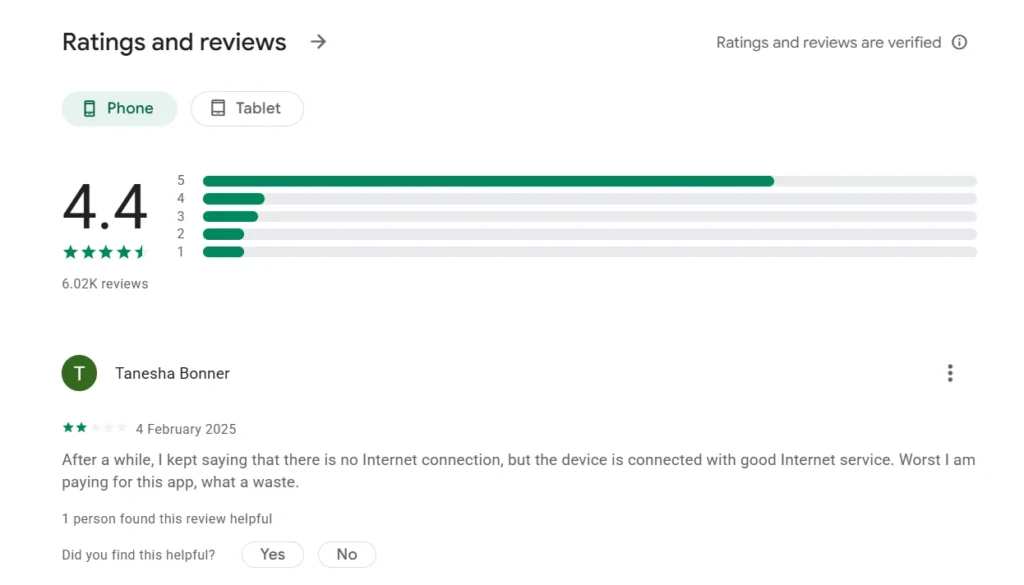
8. User Community Feedback & UGC Digest
What Users Praise
- Multi-Model Access: Users like having access to models from OpenAI, Anthropic, and Google inside one subscription instead of paying for separate tools.
- SDR Time Savings: Sales reps report saving significant research time by using automated workflows to aggregate prospect information and draft email sequences.
- Infobase Context: Team leads appreciate that stored brand guidelines keep messaging uniform across different team members.
- Accessible Entry Tier: Small teams find the $29/month Chat tier an affordable way to roll out shared AI chat to 5 team members.
Common User Complaints
- Lack of Mid-Tier Plans: Users frequently express frustration on forums regarding the price gap between the $29/month Chat plan and the $1,000/month Growth tier.
- Unpredictable Credit Consumption: Users report difficulty calculating workflow credit usage before launching large batch jobs, causing unexpected credit depletion.
- Web Scraping Errors: Marketers report that the web scraping nodes frequently fail when targeting company websites protected by Cloudflare or similar security systems.
- Slow Support for Entry Users: Subscribers on the basic Chat tier report slow response times from customer support, as priority help goes to higher-tier customers.
9. Verified Pricing & Cost Analysis
Copy.ai splits its pricing structure cleanly between basic chat usage and high-volume workflow automation.
| Plan Tier | Monthly Price | Annual Billing Price | Seats Included | Monthly Workflow Credits | Best Suited For |
|---|---|---|---|---|---|
| Chat | $29 / month | $24 / month ($288/yr) | 5 Seats | None (Chat Only) | Small teams needing shared multi-model AI chat. |
| Growth | N/A (Annual Only) | $1,000 / month ($12,000/yr) | 75 Seats | 20,000 / month | Mid-sized RevOps and SDR teams running automated workflows. |
| Expansion | N/A (Annual Only) | $2,000 / month ($24,000/yr) | 150 Seats | 45,000 / month | Growing sales organizations scaling outreach volume. |
| Scale | N/A (Annual Only) | $3,000 / month ($36,000/yr) | 200 Seats | 75,000 / month | Large operations running heavy automated workflows. |
| Enterprise | Custom Quote | Custom Quote | Custom | Custom | Large enterprises needing custom API access and SSO. |
Practical Cost Math
- 5-User Team (Chat Only): Billed annually at $24/month, the effective cost is $4.80 per seat per month. This is more affordable than buying 5 separate ChatGPT Plus accounts.
- 10-User Team (Needing Workflows): Because this requires the Growth plan ($1,000/month), the cost works out to $100 per seat per month. Unless those 10 users run heavy automated workflows daily, the unit cost is steep.
10. Direct Competitor Comparison
Here is how Copy.ai compares directly against its main market rivals, Jasper AI and Writesonic.
| Comparison Feature | Copy.ai | Jasper AI | Writesonic |
|---|---|---|---|
| Primary Focus | GTM AI Workflows & Sales Automation | Brand Voice & Marketing Campaigns | SEO Articles & Web Content |
| Entry Price | $29/mo (5 Seats Included) | $49/mo (1 Seat) | $20/mo (1 Seat) |
| Model Options | Multi-LLM (GPT-4o, Claude, Gemini) | Multi-LLM (Blended backend) | Primarily OpenAI models |
| Workflow Capabilities | Advanced visual node builder | Campaign templates | Basic article pipelines & API |
| SEO Features | Minimal (Requires manual prompt context) | SurferSEO integration support | Built-in keyword research tools |
| CRM Integrations | Webhooks, HubSpot, Salesforce | Marketing platform connectors | Webhooks & Zapier connectors |
| Main Drawback | Large price jump for workflow tiers | High per-seat cost scaling | Variable draft consistency |
11. Final Unbiased Verdict
Copy.ai is no longer just a simple writing tool for generating quick social posts or blog outlines. It has built a dedicated niche in Go-To-Market workflow automation. Its multi-model support and visual node workflows make it a practical asset for sales development teams managing high outreach volumes.
However, its pricing model creates a noticeable divide. While the $29/month Chat plan provides good value for small teams wanting shared AI chat, the $1,000/month starting price for automated workflows limits access for growing companies on modest budgets.
Who Should Buy It
- Sales Development & RevOps Teams: SDR teams that process hundreds of leads weekly and need automated prospect research, email drafting, and CRM syncs.
- Mid-Market B2B Growth Teams: Companies with established sales budgets that can fully utilize the monthly workflow credits on the Growth tier.
- Small Teams Needing Shared Chat: Teams of up to 5 people wanting a shared workspace with Claude 3.5 Sonnet, GPT-4o, and Gemini 1.5 Pro access at a low flat monthly rate.
Who Should Skip It
- Solo Bloggers & Freelancers: Independent creators who need simple long-form drafting tools without complex workflow automation.
- Dedicated SEO Content Teams: Teams focused primarily on keyword clustering, SERP analysis, and direct CMS publishing will find better built-in tools elsewhere.
- Bootstrapped Startups Needing Workflows: Small teams that want process automation but cannot allocate $12,000 annually should consider modular alternatives like Make.com connected to direct LLM APIs.